

We've all been there. You're finally settling onto the couch, snacks ready, movie queued up. You hit play, and… wait. The spinning wheel of death appears. Or worse, you're blindly stabbing at the remote in the dark, trying to find the home button before the pre-show ends.
Streaming sticks were supposed to be simple, yet many of us are stuck with clunky menus, laggy apps, and a spiderweb of cables behind the TV. If your current setup feels like it’s fighting you, it might be time for an upgrade. Enter the Amazon Fire TV Stick 4K, which promises to bring speed back to the living room.
Why the 35% Speed Boost Actually Matters
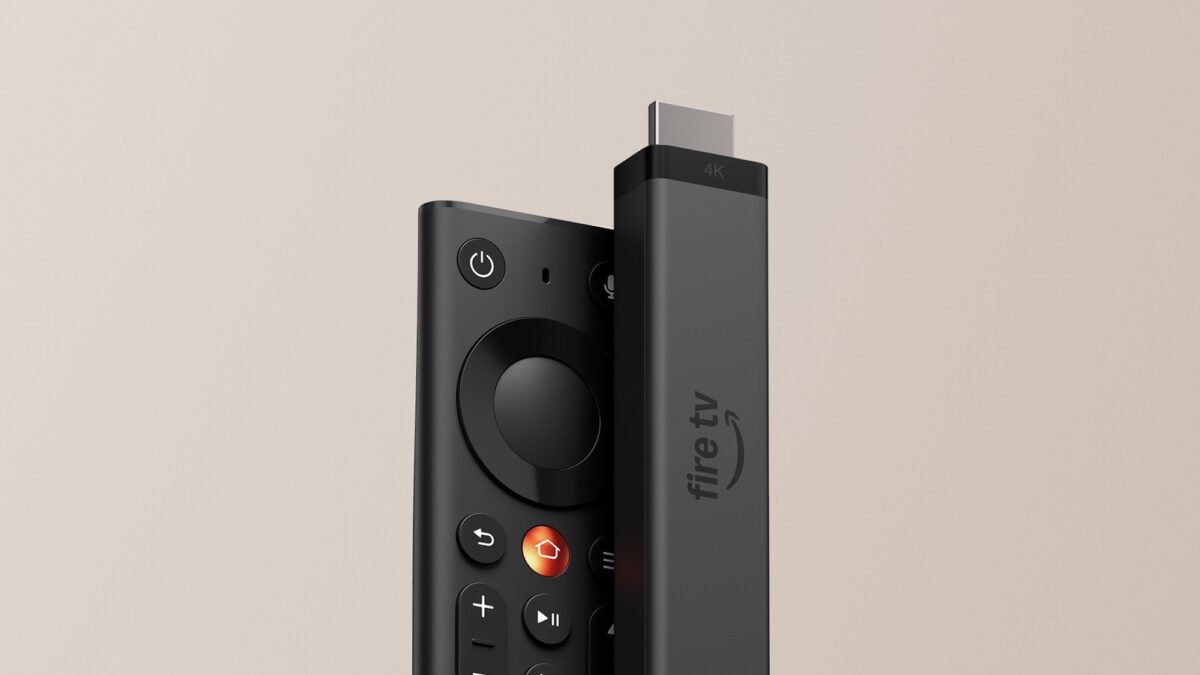
Amazon is making a bold claim with the new Fire TV Stick 4K: apps open 35% faster than similarly priced rivals. You don't need to be a tech wizard to know what that means. It's the difference between tapping the match app and it loading instantly right before kickoff, or staring at a loading screen while the game has already started.
Vega OS, Amazon's new Linux-based platform, is the engine behind this. While it might not have the flashy specs on paper, the real-world result is snappier menus and less frustration. It feels like the stick finally caught up with our impatience.
A Remote You’ll Love (and Actually Find)
Let's be honest, remotes are the unsung heroes of streaming. The new Fire TV remote finally gets a dedicated metal Home button. Given that Amazon says users press this button over 100 million times a day, giving it a distinct texture is a game-changer. You can find it by touch in a pitch-black room without awkwardly squinting at the buttons.
Plus, the customizable "Star" button—previously reserved for premium models—now lets you jump straight to your favorite app with one press. It’s a small detail that makes a daily habit smoother.
Less Mess, More Screen Time
Another win is the Direct Power feature. Instead of hunting for a wall outlet, the Fire TV Stick 4K can draw power directly from your TV’s USB port. One less cable, one less power brick cluttering your entertainment center. It’s a cleaner look that keeps the focus on the screen, not the wires.
The Trade-offs: What You Need to Know
Speed isn't everything, though. If you’re a videophile with a Dolby Vision TV, this model tops out at HDR10+, so you might want to look at the "Max" version instead.
Also, Vega OS comes with a catch: it drops support for sideloading and developer options. If you’re a tinkerer who loves installing third-party apps outside the Amazon store, this isn't the stick for you. But if you stick to the major streaming giants, you’ll find over 2,000 apps ready to go, including heavy hitters like Spotify and VLC.
Who Should Upgrade to the Fire TV Stick 4K?
This stick is a no-brainer if you want a reliable, fast upgrade for your main TV or a sleek backup for the bedroom. It handles the big streaming apps effortlessly and ditches the lag that plagues older models.
Tinkerers and Dolby Vision purists can look elsewhere, but for the rest of us, the Fire TV Stick 4K nails the boring stuff that actually matters: speed, simplicity, and a better remote.
Ready to finally ditch the spinning wheel? Grab the Amazon Fire TV Stick 4K and turn your waiting room back into a watching room.