

Picture this: your high-end gaming rig is humming, ready to deliver buttery-smooth virtual worlds, but every time you strap on a headset, the cables tangle, the weight pulls your neck forward, and the immersion instantly shatters. It’s the exact dilemma facing PC gamers in 2026. Do you settle for a versatile all-in-one device, or finally invest in a wireless powerhouse built strictly for your Steam library? The choice between the Valve Steam Frame and Meta Quest 3 isn’t just about raw specs—it’s about how you actually want to play. Let’s cut through the marketing noise and see which one truly earns your desk space.
The Weight Difference: All-Day Comfort Without the Face Strain
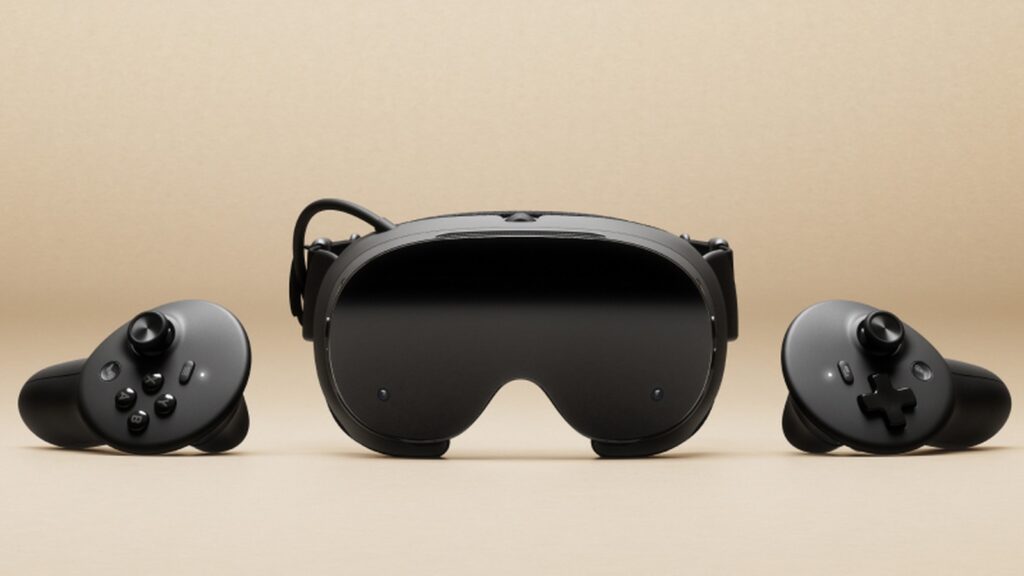
Comfort is the silent dealbreaker in VR. At 515g, the Quest 3 leans noticeably forward, but the Steam Frame completely flips the script. By shifting the battery to the rear strap, Valve leaves only 185g resting directly against your face. Put it on for a weekend marathon, and you’ll genuinely forget the hardware is even there. The balance is so refined that it eliminates that familiar tight-clamping sensation around the temples.
Just a quick practical heads-up: reviewers noted that the rear-weighted design sits tighter if you wear prescription glasses, so you’ll want to account for that before dropping $1,059. But for standard setups, the ergonomic leap is undeniable.

True Wireless PC Gaming: Dual-Radio Magic & Instant SteamOS Access
If your gaming rig is already packed with Steam titles, this is where the Frame justifies its premium. It doesn’t just connect to your PC—it becomes a seamless wireless extension of it. Thanks to a dedicated Wi-Fi 6E adapter and dual-radio architecture, one dedicated stream handles your high-fidelity VR gameplay while the second radio quietly manages your regular home network traffic. That means zero bandwidth fights and virtually zero latency spikes.
Wake the headset up, and your entire SteamOS library loads instantly. Paired with foveated eye-tracking rendering, the system intelligently directs GPU power exactly where your eyes are looking, keeping frame rates silky smooth even in graphically heavy titles. It’s a PC VR streaming experience engineered specifically for players who refuse to compromise on visual fidelity or wireless freedom.
Standalone Freedom vs. PC-First Focus: Library & Battery Reality Check
Here’s the straightforward breakdown of what you’re actually getting when you unbox each device:

- Meta Quest 3 ($599.99): Built for standalone play first. It boasts a highly polished ecosystem of 1,000+ native titles, delivers roughly 2.2 hours of battery life, and ships with full-color mixed-reality passthrough right out of the box. Perfect for families, casual couch gaming, and AR-style apps that blend into your living room.
-
Valve Steam Frame ($1,059): A dedicated PC VR powerhouse with a focused vision. At launch, it runs about 130 native titles natively, with battery life hovering just under an hour during intense PC-streamed sessions at maximum refresh. The tracking cameras default to monochrome (upgrading to full-color passthrough requires a separate $149 add-on).
 The trade-off is crystal clear. Quest 3 is your versatile, plug-and-play entertainment hub. The Steam Frame is a specialized, no-compromise bridge to your existing PC gaming ecosystem. Note that initial batches are currently rolling out via a reservation lottery, so grab your spot early if you’re leaning toward Valve’s approach.
So, which headset actually belongs on your shelf? If you’re building a family VR setup or love jumping into casual mixed-reality experiences straight out of the box, the Quest 3 delivers unmatched flexibility and value. But if you already live inside your Steam library, crave true wireless freedom, and want a headset so balanced it feels like a second skin, the Steam Frame is a masterpiece of focused engineering. It won’t replace your everyday living room console, but it will absolutely transform your high-end gaming rig into an untethered immersive escape. Choose the tool that matches your playstyle, step into VR without looking back, and finally experience gaming exactly how it was meant to feel.